The Mega Gaming Icon Set: A Vector Toolkit for Modern Game Design
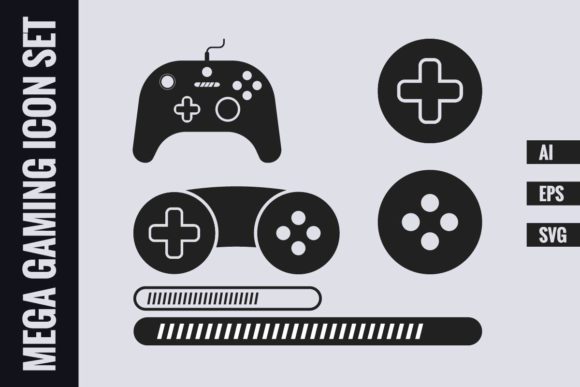
In the high-paced world of digital game design and development, the right visual assets can make or break a project's polish and professionalism. A Mega Gaming Icon Set in Vector Format isn't just a collection of images; it's a strategic toolkit designed to integrate seamlessly into your creative workflow. This particular set, featuring gamepads, loading indicators, and joystick buttons, offers a foundational visual language for interfaces, marketing materials, and user guides.
What Makes a Vector Gaming Icon Set "Mega"?
The term "Mega" here speaks to utility and quality rather than sheer quantity. This set provides essential, high-use symbols in a format that grants you maximum control. Instead of dozens of niche icons, you get core elements – two distinct gamepad icons, two styles of loading icons, and two types of joystick button icons. This focused selection allows you to establish consistent branding and UI elements without clutter. The "Mega" value comes from the versatility of the vector formats provided: an AI file for Adobe Illustrator, an EPS for broader compatibility, and an SVG for modern web and app development.
These icons are not static pixels. As vectors, they are mathematically defined shapes. This means you can scale a tiny joystick button icon to billboard size without a single pixel blurring or artifact. You can change colors instantly to match your project's palette, separate elements, or even modify shapes if your design software allows. This flexibility is what separates a professional asset from a generic stock image.
Unpacking the Formats: AI, EPS, and SVG
The included zip file contains three powerhouse formats, each serving a specific role in a modern designer's toolkit. The Vector AI file is the native format for Adobe Illustrator, offering the deepest level of editability for users within that ecosystem. Layers, paths, and effects are fully preserved.
The Vector EPS file acts as a universal ambassador. Many software packages, from older desktop publishing suites to newer graphic tools, can import and use EPS files. It ensures that the Mega Gaming Icon Set remains accessible even if you're not working in Illustrator.
Perhaps the most crucial format today is the Vector SVG. Scalable Vector Graphics are the standard for the web. They are code-based, meaning they can be styled with CSS, animated, and manipulated directly within web projects. Using the SVG files from this set for a game's website, an online store button, or within a web-based app ensures crisp, performance-friendly graphics on any screen.
A key practical note: the files are packaged in a zip archive. This is standard practice for distributing multiple digital assets. Simply unzip the folder on your computer to access the individual AI, EPS, and SVG files ready for use.
Integrating Gaming Icons into Real-World Projects
How does a set like this fit into actual workflows? Consider a game developer creating a mobile app. The loading icons are perfect for transition screens, providing visual feedback to the user. The gamepad icons could be used on the settings menu to indicate controller support options. For a gaming news website, the joystick button icons might serve as intuitive visual cues in articles discussing control schemes or gameplay tutorials.
Beyond pure game development, these icons have value in adjacent industries. An esports event organizer might use them in promotional flyers and digital banners. A hardware company selling gaming accessories could integrate them into product manuals and packaging design to convey functionality quickly. The consistent, clean style of a professionally designed vector set lends credibility and immediate recognition.
The benefit is uniformity. By using the same set of vector icons across your website, app, and printed materials, you build a cohesive visual identity. A user sees the same stylized gamepad icon on your social media post and your support page, reinforcing brand recognition and trust.
Practical Considerations Before You Use Vector Icons
Adopting a pre-made icon set like the Mega Gaming Icon Set requires a few simple checks. First, ensure your design software supports one of the provided formats. Most modern programs handle SVG or EPS. Second, consider your color needs. Vector graphics are typically easy to recolor, but check that the icons are structured in a way that allows simple color changes – most professional sets are.
Also, think about scale. While vectors scale infinitely, the level of detail matters. An icon designed for a 32-pixel square app button might look overly simplistic when blown up for a poster. This set’s icons, being fundamental symbols, are likely designed with clear, bold forms that work at a range of sizes.
Finally, reflect on customization. Do you need to tweak the icons slightly? The AI file offers the most freedom for major edits. The SVG file allows for code-based adjustments like stroke width. If you only need to place them as-is, the EPS or SVG will suffice. Choosing the right format from the unzipped folder for your specific task is the final step to efficient implementation.
Why Vector Format is the Industry Standard
The decision to provide this Mega Gaming Icon Set exclusively in vector format is a deliberate one, aligning with professional standards. For digital design, raster images (like JPEGs or PNGs) lock you into a fixed resolution. A vector foundation future-proofs your assets. Today, you might use an SVG icon on a website. Tomorrow, you could need the same icon at ten times the size for a trade show display. With the vector files, you simply open, scale, and export – quality remains perfect.
This is particularly important in gaming, a field defined by rapid technological change and multiple display platforms from smartphones to 4K monitors. Assets must adapt. Furthermore, vectors facilitate collaboration. A designer can pass the AI file to a colleague who can make precise adjustments without starting from scratch. The set becomes a living part of the project's asset library, not a static, frozen element.
By focusing on core gaming symbols in a universally editable format, this Mega Gaming Icon Set in Vector Format provides a robust, scalable solution. It removes the need to create these common icons from scratch, saving valuable time while guaranteeing a professional, polished visual output that can grow and evolve alongside your project itself.